Software company · engine department

We write the software.
You stand the watch.

MakinaLabs is a software company. We build programs and applications that help marine engineers work more easily on the plant — start, run, and fix — without learning on a live machine.

We make it simple, we make it clear. For every marine engineer.

What we do

Software for the engine department, built by a chief engineer who is still at sea.

MakinaLabs builds software for marine engineers. Our programs start from the jobs that fill an engineer's day: taking soundings, writing the noon report, planning a bunkering, keeping the Oil Record Book, and bringing a machine back on line when it misbehaves.

Because the work comes first, the programs follow the way things are really done on board. They are meant for everyone in the department, from cadets and oilers to the chief engineer, and they stay useful whether or not the ship has a connection.

Daily records, done properly

Soundings, fuel figures and reports take up a real part of every watch. We turn that work into one clear routine, so the numbers are worked out the same way each time and are ready when the chief or the office asks for them.

  • Tank soundings with trim and heel correction
  • Noon reports, ROB and consumption logs
  • Bunkering and consumption plans
  • e-ORB with guided MARPOL entries

Training without the risk

Some lessons are expensive to learn on a live plant. Our Diskarte simulators let engineers start, run and troubleshoot a machine, make their mistakes safely, and see exactly what caused them.

  • Oil purifier and fresh water generator types found at sea
  • Control panels modelled on the makers' manuals
  • Step-by-step procedures with the reason for each step
  • Fault drills, with readings that respond to what you do

Made for life on board

A ship is not an office. Connections drop, time is short and people change over. So we keep our software simple to pick up, and it runs on the phones and computers engineers already have with them.

  • Keeps working at sea with no internet
  • Available for Android and Windows
  • Prints reports with the calculations shown
  • Backup that makes a handover easier

Five programs are in use today: Tank Chief, Voyage Chief, Cheng Suite and two Diskarte simulators. More engine-room systems will follow as they are ready.


Software we already make

Five programs in use today. These are real screens from the programs. Ship names and other private details are masked; Voyage Chief shows its built-in sample voyage.

Tank sounding and bunkering

Tank Chief

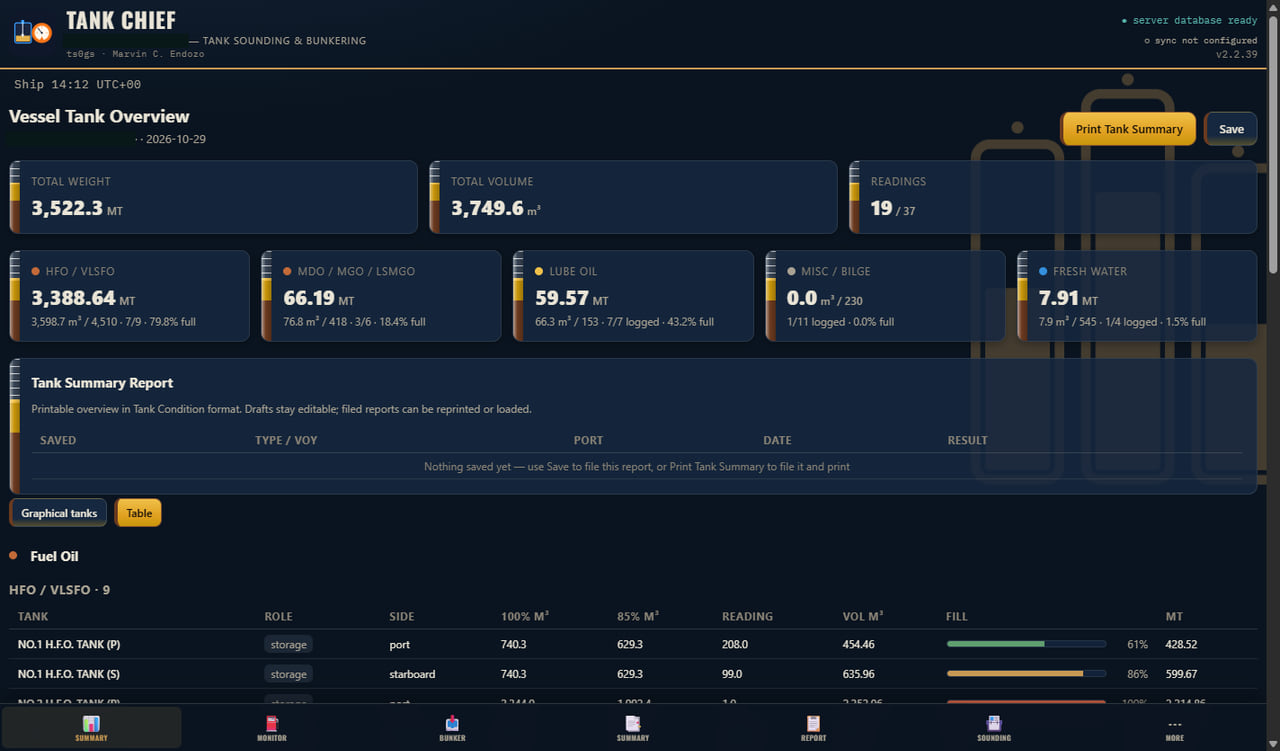
Fuel tank management for the engine department. It replaces the sounding workbook with double interpolation, ASTM 54B and tables you can correct yourself.

  • Sounding with trim and heel correction
  • Editable calibration tables
  • Capacity-book PDF table import
  • Bunkering plan and live monitoring
  • After-bunkering and BDN reports
  • VCF / WCF and ISO 8217 references

Why it helps

  • Get the same answer every time, because the program does the interpolation, not a tired hand.
  • Plan a bunkering before it starts, with a target ullage for every tank.
  • Keep working at sea. It runs with no connection and prints with its calculations shown.
Next: Voyage Chief
Tank Chief: Tank overview

Noon reports and voyage performance

Voyage Chief

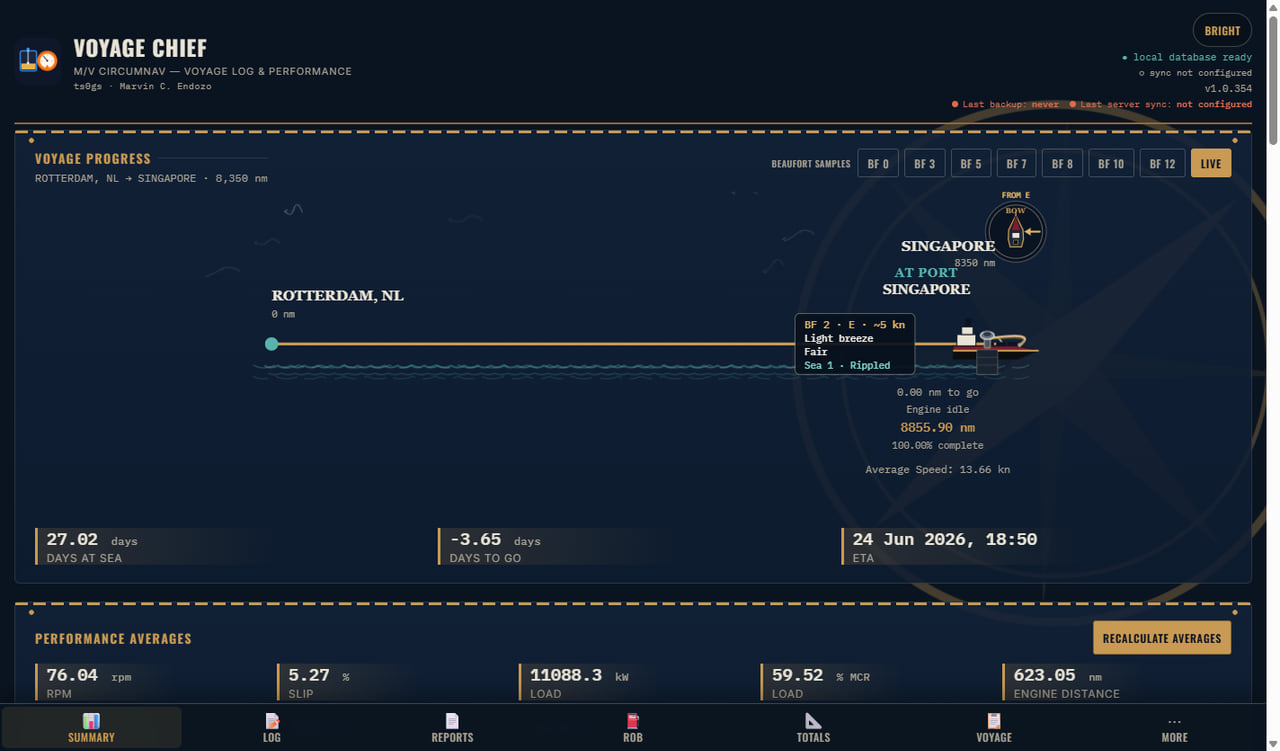
Offline ship performance and fuel logging for engine department noon reports. It works on Android phones and PC, and syncs to your own server when you reach one.

  • Fuel, RPM, speed and slip
  • SFOC against reference
  • CII and CO₂ estimate
  • Ship’s clocks with zone changes
  • Beaufort and sea state
  • Backup, CSV export and server sync

Why it helps

  • Spot a problem early by watching fuel use against your reference curve.
  • Keep your noon reports going with no internet, on a phone or a PC.
  • Replace scattered workbooks with one log that keeps the totals for you.
Next: Cheng Suite
Voyage Chief: Voyage progress

The all-in-one for the engine office

Cheng Suite

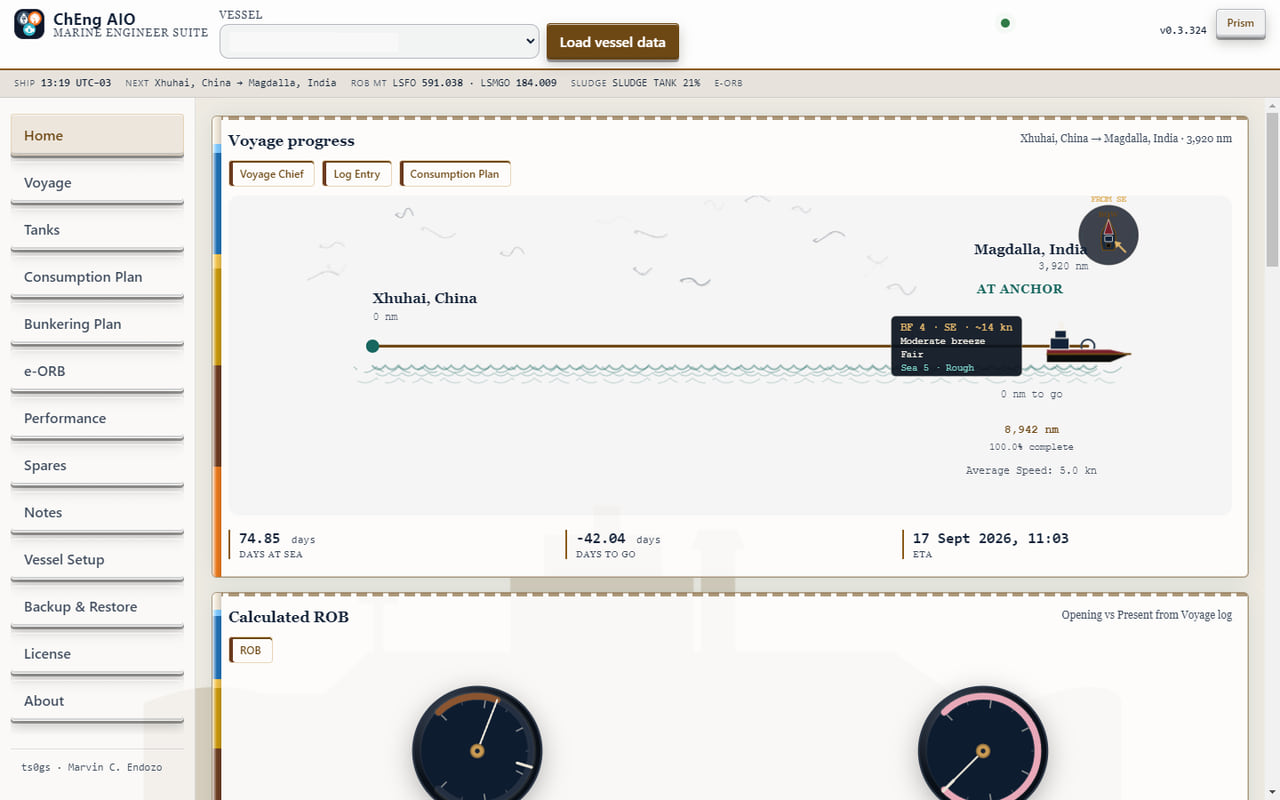
Voyage Chief and Tank Chief under one shell, with one vessel shared between them. Everything a chief engineer logs and plans sits in a single program.

  • Voyage and tanks together
  • Consumption and bunkering plans
  • e-ORB with guided MARPOL entries
  • Performance calculator
  • Spares requisitions and notes
  • One vessel setup and full backup
  • Runs on ship with its own server

Why it helps

  • Enter the vessel once and use it everywhere.
  • Stop switching between programs for the daily log, the tanks and the plans.
  • Keep the whole engine office in one place, on board, with or without a connection ashore.
Next: Purifier Simulator
Cheng Suite: Home dashboard
Diskarte

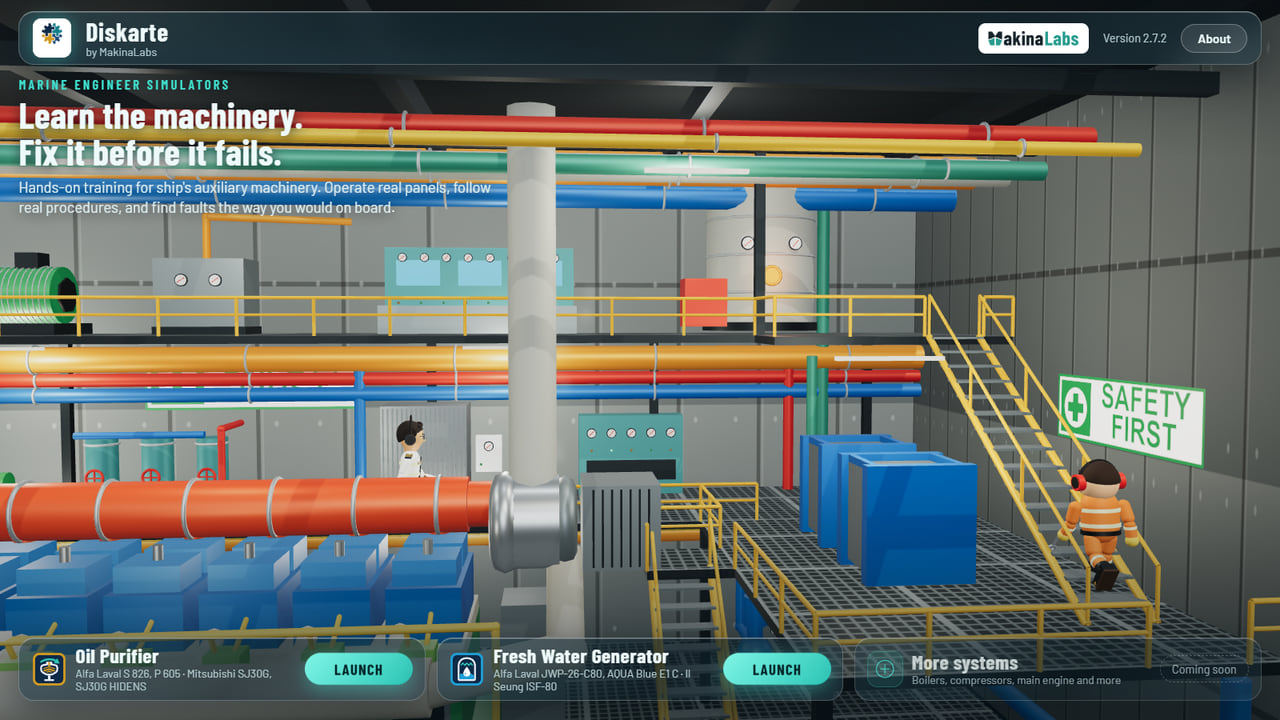
Diskarte is Tagalog: the quiet skill of finding a way when the plant is not in the book. Our two simulators live inside it, on a 3D engine-room dashboard for Android and Windows. A simulator keeps running when you go Home.

The Diskarte dashboard: a 3D engine room with crew on their rounds, and launch cards for the Oil Purifier and Fresh Water Generator simulators

Part of Diskarte

Purifier Simulator

Alfa Laval S 826 · P 605 · Mitsubishi SJ30G · SJ30G HIDENS

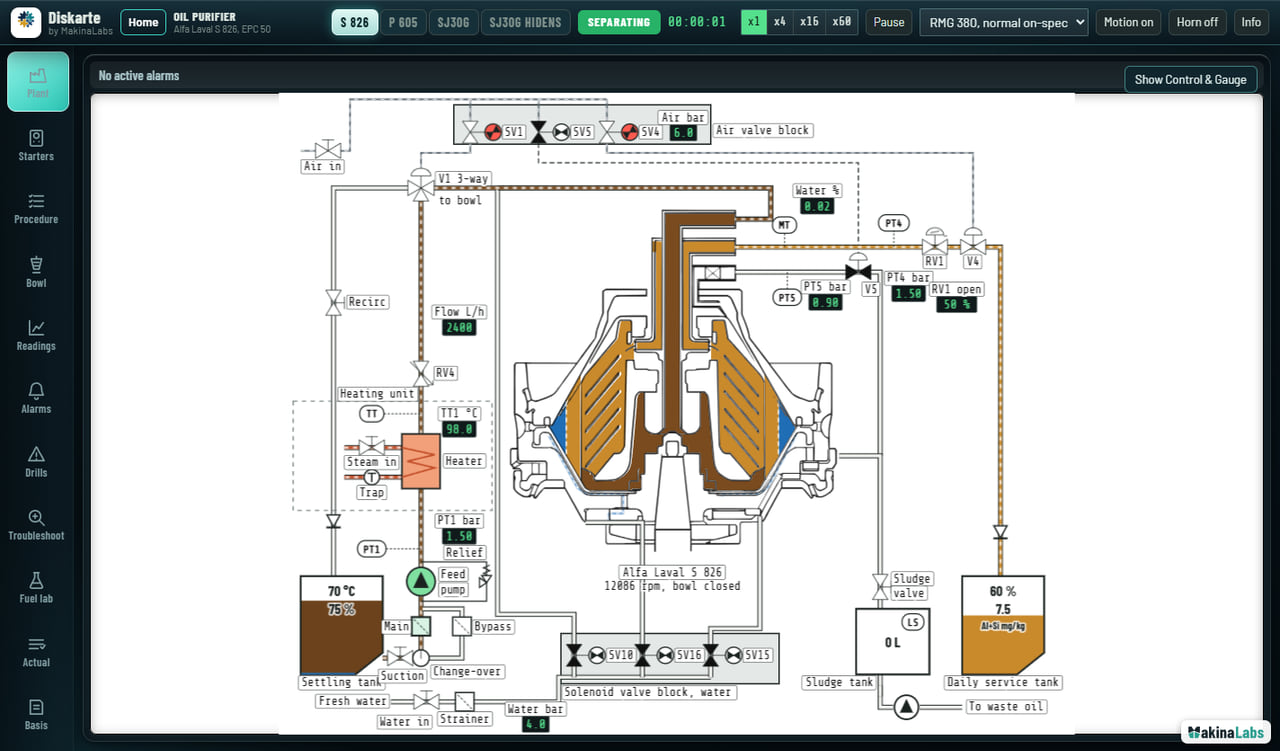
Line up the system, start the bowl, work the control panel, fit a gravity disc, and clear faults like a blocked strainer or a failed discharge.

  • Live plant mimic and valve block
  • EPC 50, EPC 60 and Samgong panels
  • Animated bowl cutaway and process
  • Steps with the reason for each
  • Alarms, drills and troubleshooting
  • Fuel lab against ISO 8217

Why it helps

  • Learn without risk. A mistake here costs nothing on a real bowl.
  • Understand the machine, because every step shows the reason behind it.
  • Rehearse the faults that are rare on board, before you meet them on watch.
Open simulator
Purifier Simulator: Plant

Part of Diskarte

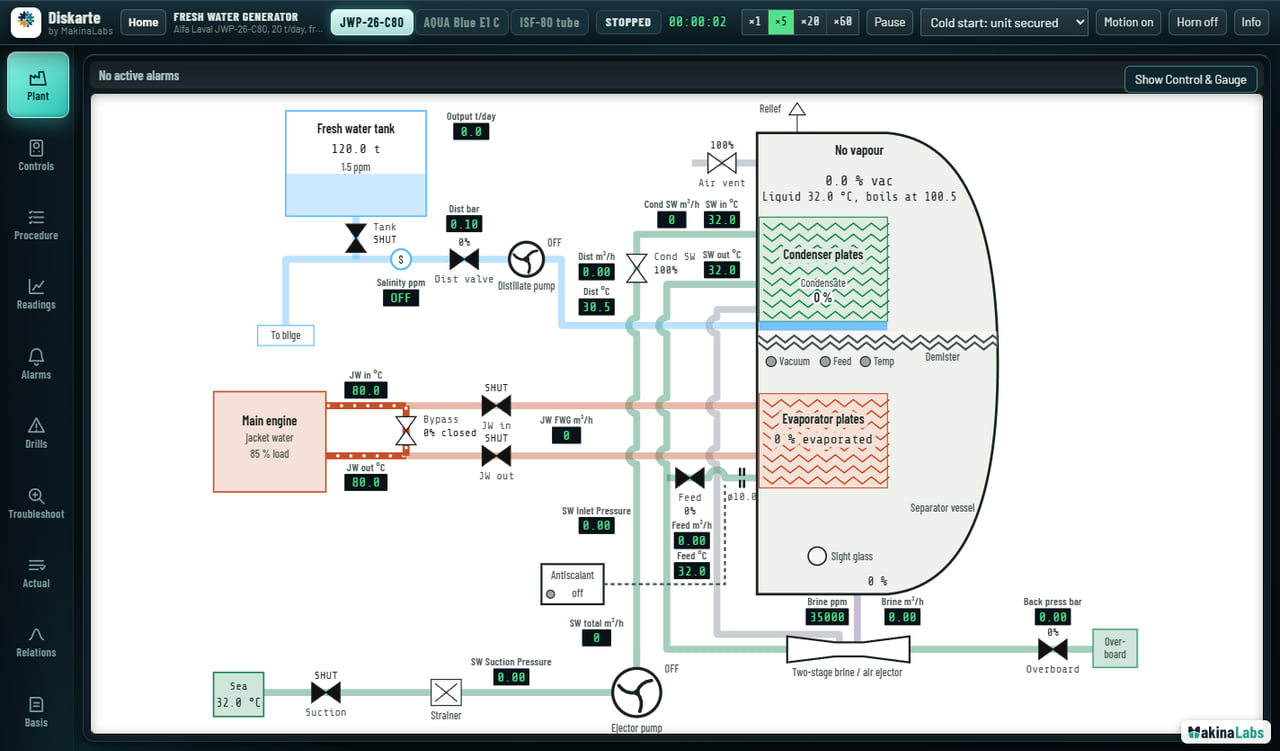
Fresh Water Generator Simulator

Alfa Laval JWP-26-C80 · AQUA Blue E1 C · Il Seung ISF-80

Make distillate from sea water on jacket-water heat. Pull vacuum, feed the evaporator, bring on heat, and keep salinity and output in the window.

  • Plant mimic with live heat and mass
  • Control panel and salinometer dump
  • Operating window and trends
  • Scale, priming and air-leak drills
  • Steps with the reason for each
  • Actual versus simulator readings

Why it helps

  • Build the feel for vacuum, heat and salinity without wasting real water or fuel.
  • See cause and effect at once, because the plant and readings respond live.
  • Train on plate and tube types before you join a ship that has them.
Open simulator
Fresh Water Generator Simulator: Plant

Where it runs

One web code base. Wrapped for the engine office and for the cabin.

Windows

Portable Diskarte app. Rail tabs, no page scrolling, plant on a light board inside a dark glass chrome.

Android

Landscape, notch-aware. The plant fills the screen. Everything else pops up. Pinch to zoom.

Browser

The simulators on this site are the same programs. Your manuals and company procedures still take priority.

The maker

Marvin C. Endozo

Chief Engineer. He builds these programs from the plants he runs, so the next watch does not have to learn only by breaking something real.

He currently sails with Golden Union Shipping Co., S.A. These are MakinaLabs programs, not Golden Union products.